
Submodule 5.3: More elements
Completion requirements
View
- div element
- float and clear tags
- span element
Float and Clear
So, we have our familiar code:
<!DOCTYPE html>
<html lang="en">
  <head>
     <style>
       .cl1 {background:yellow; font-size:1em; font-family:courier; width:20%}
        .cl2 {background:lightblue; font-size:1em; font-family:courier; width:20% }
     </style>
   </head>
   <body>
     <div class="cl1">
        This is a div with a yellow background
     </div>
     <div class="cl2">
        This is a div with a blue background
     </div>
     <ol >
        <li>First item</li>
        <li>Second item</li>
     </ol>
   </body>
</html>
and its output:
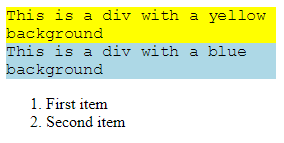
We want to achieve the output shown in the image. We need to move the yellow div totally left and place the blue div next to it.

To achieve this, we will use the float property which specifies how an element should float.
In our code, we create a class and we name it .leftfloat.
.floatLeft{float:left}we apply this class in both divs
<div class="cl1 floatLeft"><div class="cl2 floatLeft">The output:

We see that the list has also relocated. We don't want that. To correct this we will use another CSS property called "
clear". This specifies which elements can float beside the cleared element and on which side.Thus, we go in our code and create a class with name
.clearLeft .clearLeft{clear: left}we apply this class in our list:
<ol class="clearLeft">We have achieved our desirable outcome.
In order to continue the procedure with more html elements we have to apply both the
.floatLeft and .clearLeft classes in our list.<ol class="floatLeft clearLeft"><!DOCTYPE html>
<html lang="en">
<head>
<style>
.floatLeft{float:left}
.clearLeft{clear:left}
.cl1 {background:yellow; font-size:1em; font-family:courier; width:20%}
.cl2 {background:lightblue; font-size:1em; font-family:courier; width:20% }
</style>
</head>
<body>
<div class="cl1 floatLeft">
This is a div with a yellow background
</div>
<div class="cl2 floatLeft">
This is a div with a blue background
</div>
<ol class="floatLeft clearLeft" >
<li>First item</li>
<li>Second item</li>
</ol>
</body>
</html>For more information: https://www.w3schools.com/css/css_float.asp