Submodule 4.2: Pseudo-classes and display properties
| Site: | pro.digbi |
| Course: | Web Design [HTML und CSS] |
| Book: | Submodule 4.2: Pseudo-classes and display properties |
| Printed by: | Gast |
| Date: | Wednesday, 22 July 2026, 2:14 AM |
Description
- Pseudo classes
- CSS Display
Pseudo- classes
Pseudo- classes in CSS are used to change the appearance of an element at different events.
Example of events:
- When the user mouses over an element
- When a link is not visited, visited, hover or active
The general syntax for pseudo-classes is the name of our selector and the pseudo class with a colon between them.
Example:
p: hover { font-size: 1.2em; }The above would make the text inside any p element to appear bigger when the user mouses over the element.
The most common usage of pseudo-classes is in the links.
Links have four different states.
- a: link: unvisited link
- a: hover: mouse over
- a: active: selected link
- a: visited: visited link

Note: In CSS the active state should always be written after the hover state. Hover state should be declared after link and visited states.
For more information: https://www.w3schools.com/css/css_pseudo_classes.asp
Exercise
- Open your editor, create a new file and save it as
exersice04.2.01.htmlin the folder "Exercises". - Modify and save the file. The browser's output should be as shown in the following image:

CSS Display
The display property is used to define how elements would appear on the page.
The most common values for display are inline and block.
A practical use of the display property is in the navigation bar.
The navigation bar consists of a list of links.
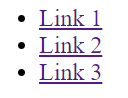
In a navigation bar, we want all the area of our link items to be clickable (including its border area). This is achieved by using the block value. Thus the CSS would be:
li { display: block; }A navigation bar can be vertical or horizontal.
By default, the list will appear vertical.
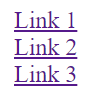
However, if we want to create a horizontal navigation bar, we should make the list items to appear next to each other. This can be achieved by applying the value inline to the CSS property display.
Example:
li { display: inline; } 
Note:
In the above examples we apply the display property to the list items and not to the <ul> since it’s their behavior the one we want to change.
Display: none;
display: none; is commonly used with JavaScript to hide and show elements without deleting and recreating them.